



Learn how to choose the best data quality tools for e-commerce and software teams. Compare key features, avoid common mistakes, and improve data accuracy.
Clean data has become a real business need for e-commerce and software teams. Online stores need accurate product details, customer records, orders, stock levels, and sales reports. Software teams need clean user data, usage data, support history, and billing records. When this data is wrong, the business feels it fast.
Teams comparing the best data quality tools should look beyond long feature lists. The better question is simple. Can the tool help the team find, fix, monitor, and prevent data issues before they affect customers, reports, or AI systems?
This matters because data problems rarely stay in one place. One wrong product field can affect search filters, ads, product feeds, and customer experience. One duplicate customer record can confuse support, email campaigns, and revenue reports.
Why Data Quality Matters for E-commerce and Software Teams
E-commerce teams deal with data every day. Product names, SKUs, prices, categories, variants, inventory levels, customer addresses, and order details all need to stay accurate. If product information is incorrect, customers may see inaccurate details or struggle to find what they need. If inventory data is wrong, the store may sell items that are no longer available.
Software teams face similar issues. User records, account details, plan types, support tickets, onboarding steps, and product usage data must be clear. If these records are incomplete or outdated, teams may make poor decisions about product, sales, or support.
Platforms from companies like Ataccama show how data quality can connect with observability, cataloging, lineage, and governance. This kind of connected approach helps teams work with trusted business data rather than repeatedly fixing the same errors.
What to Look for When Comparing Data Quality Tools
E-commerce and software teams should look for a tool that can support daily operations, reporting, customer experience, and future data needs.
Match the Tool to the Business Problem
The right tool should fit the main data issues the business already faces. For example, an e-commerce team may need help with product details, SKUs, inventory records, and customer profiles.
A software team may need stronger support for user records, billing data, support history, and usage data.
Teams should list the problems that slow them down the most before comparing platforms. This makes it easier to avoid paying for features they do not need.
Check Core Data Quality Capabilities
Good data quality tools should check key areas such as accuracy, completeness, consistency, timeliness, validity, and uniqueness. These checks help teams understand if their data is correct, complete, current, and ready for use.
For e-commerce teams, this may include finding products with missing categories, invalid prices, or duplicate listings.
For software teams, this may include checking account records, plan types, user details, and support data.
Look for Profiling Across Key Systems
The tool should profile data from the systems the business already uses. This may include e-commerce platforms, CRMs, data warehouses, payment tools, support platforms, or product analytics systems.
Profiling helps teams see the current condition of their data before they clean or move it. Without this step, teams may not fully understand the size or source of the problem.
Choose Tools with Ongoing Monitoring
Data quality should not stop after one cleanup. New data enters business systems every day, so the tool should monitor data quality over time.
Monitoring helps teams catch problems early. For example, a sudden increase in missing product details may point to an import issue. A drop in completed customer records may signal a broken form or integration.
Review Cleansing and Standardization Features
The tool should help teams clean and standardize data after issues are found. This may include removing duplicates, fixing formats, correcting invalid entries, or standardizing country names, product categories, and contact fields.
Standardization is important when data comes from different systems. Clean and consistent records are easier to use in reports, campaigns, product feeds, support workflows, and AI tools.
Understand How Issues Are Fixed
Detection is useful, but it is not enough. Teams should assess how the tool helps users understand what caused the issue and what action to take next.
Good tools should support remediation workflows, ownership, alerts, and clear next steps. This helps teams move from finding problems to actually fixing them.
Make Sure Business and Technical Teams Can Use It
Data quality should not sit only with developers or data engineers. Business users should be able to understand results, review issues, and support cleanup where needed.
Technical teams still need strong controls, integrations, and governance features. The best setup allows both sides to work together without slowing each other down.
6 Mistakes to Avoid When Choosing a Data Quality Tool
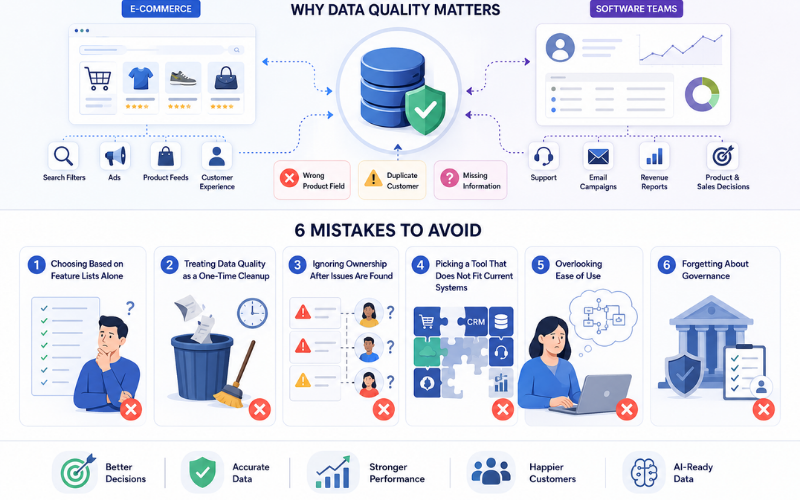
Many teams waste time and budget by choosing a tool before fully understanding their data problems. The right choice should support real workflows, current systems, and long-term data management.
1. Choosing Based on Feature Lists Alone
Long feature lists can look impressive, but they do not always mean the tool is the right fit. The better question is whether the tool solves the team’s actual data problems.
A small e-commerce team with messy product data may need a practical tool for profiling, cleansing, and standardization. A larger software company may need stronger monitoring, lineage, governance, and pipeline support.
2. Treating Data Quality as a One-Time Cleanup
One-time cleanup can fix current errors, but it does not stop new problems from entering the system. Data changes every day through orders, signups, imports, integrations, support updates, and product changes.
Teams should choose a tool that supports continuous monitoring and repeatable rules. This helps prevent the same issues from returning.
3. Ignoring Ownership After Issues Are Found
Reports full of errors do not help if no one owns the next step. Teams need to know who should review, fix, approve, or prevent each type of issue.
Clear ownership helps turn data quality from a reporting task into a real business process. It also reduces confusion between business users, data teams, and technical teams.
4. Picking a Tool That Does Not Fit Current Systems
A tool may have strong features, but it still needs to work with the company’s current stack. Teams should check if it connects with their e-commerce platform, CRM, data warehouse, billing system, support tools, and analytics setup.
Poor fit can create more manual work. The tool should make data easier to manage, not add another disconnected system.
5. Overlooking Ease of Use
Some tools are too technical for business users. This can slow down adoption because every issue depends on developers or data engineers.
Teams should look for clear dashboards, simple explanations, useful alerts, and workflows that non-technical users can understand. Data quality improves faster when more people can take part.
6. Forgetting About Governance
Governance should not be treated as an extra feature. Someone needs to define data rules, approve standards, manage ownership, and track accountability.
Without governance, teams may clean data today and create the same errors tomorrow. Strong governance helps keep data accurate, consistent, protected, and easier to trust as the business grows.
The Right Tool Should Match Real Business Needs
The best data quality tools do more than clean messy records. They help teams understand their data, fix issues, monitor changes, and prevent the same problems from spreading.
For e-commerce and software teams, this can improve product data, customer records, reporting, support, operations, and AI projects. The right tool does not have to be the most complex option. It should fit the team’s systems, solve real problems, and support cleaner decisions as the business grows.
Related Posts
- Evaluating the Benefits of Shopify Plus for Enterprise Growth
- How AI APIs Are Changing Modern eCommerce Website Development
- Why Configuration Management Matters for Magento and Cloud-Hosted Stores
- Best AI Website Builder in 2026: Tested, Ranked, and Compared
- Why Customer Service Calls Are Getting Answered by AI Agents
- How to Choose the Best Data Quality Tools for E-commerce and Software Teams