



See how Seedream 5.0 Pro and Veo 3.1 turn product images into Magento catalogue videos through nine tests covering quality, accuracy, costs, and formats.
Frames from four of the clips. The lamp, the rooms and the hands are all generated; the store is fictional.
Most Magento catalogues already have what a video model needs: a clean packshot of every product. What they usually lack is motion. That means the slow turn that shows a product's shape, or the short clip of a lamp being switched on in a room that looks like someone's home. A photographer can shoot those for a few hero products. Doing it for a whole catalogue is where the budget runs out.
So we tested the obvious shortcut: start from a still, generate the motion, and see what survives. Our store is fictional. Kestrel & Clay is a small homeware shop we invented, and its product is a table lamp with a round, finely speckled stoneware base, an oatmeal linen drum shade and a black cord with a small brass inline switch. A lamp is a useful test subject because it has a function the video has to show correctly (how it turns on) as well as a surface (the glaze) that customers will look at closely.
We made the stills with ByteDance's Seedream 5.0 Pro (seedream-5-0-pro) and animated them with Google's Veo 3.1, mostly the veo3.1-fast variant, with one run each on veo3.1-quality and veo3.1-lite. Nine tests, six stills and eight clips cost $1.83 in generation fees.
Two limits up front. Our "packshot" is itself generated, so it is cleaner and more consistent than many real photographs. Your own product photos may behave differently. And each result is one generation, so the patterns below are things to check in your own catalogue, not rates you can rely on.
The setup
Both models run as asynchronous jobs. You post a request, store the task ID, poll until the task completes, and download the file before its link expires after 72 hours. The image model takes up to ten reference images for edits; we used one. The video model's Ext variants return an 8-second clip in 16:9 or 9:16. With generation_type set to frame, the first image becomes the opening frame and an optional second image becomes the closing frame. With reference (Fast only), the images guide the look of the scene without fixing any frame. The code below is a simplified illustration with a placeholder host, not our exact runner. Our runner also wrote each task ID to disk before polling, so a dropped connection could not lead to a paid job being sent twice.
import os, time, requests
BASE = os.environ["MEDIA_API_BASE"] # placeholder host
H = {"Authorization": "Bearer " + os.environ["MEDIA_API_KEY"]}
def job(path, body):
task_id = requests.post(f"{BASE}{path}", headers=H, json=body, timeout=60).json()["data"][0]["task_id"]
save_task_id(task_id) # before polling
while True:
t = requests.get(f"{BASE}/v1/tasks/{task_id}", headers=H, timeout=30).json()["data"]
if t["status"] in ("completed", "failed", "cancelled"):
return t
time.sleep(8)
# edit the master packshot into a room scene
room = job("/v1/images/generations", {
"model": "seedream-5-0-pro", "prompt": ROOM_PROMPT,
"image_urls": [MASTER_URL], "size": "16:9", "resolution": "2K"})
# animate between two stills: lamp off, then lamp on
clip = job("/v1/videos/generations", {
"model": "veo3.1-fast", "prompt": SWITCH_ON_PROMPT, "duration": 8,
"aspect_ratio": "16:9", "resolution": "720p",
"generation_type": "frame", "image_urls": [ROOM_OFF_URL, ROOM_ON_URL]})
Test 1: one prompt, two lamps
A catalogue needs the same product in more than one shape: a square image for the gallery and a wide one to start a 16:9 video. We sent one packshot prompt twice, once at 16:9 and 2K, and once at an exact 1600 by 1600 pixels:
E-commerce packshot: a table lamp with a round speckled cream stoneware base and a drum shade in natural oatmeal linen, a thin black fabric cord with a small brass inline switch, standing centred on a pure white seamless background, soft even studio lighting, a gentle shadow under the base, no props, no text.
The square image is exactly what a store would want: a spherical speckled base, a straight drum shade, and the cord running out across the floor to a brass switch. It took 53 seconds and cost $0.026. An exact size of 2.56 million pixels was billed at the lower tier, the same price as 1K.
The 16:9 image, at 2560 by 1440 for $0.053, shows a different lamp. Its base is a squat disc on a stem, its shade is tapered, and its cord runs up from nowhere and loops over the top of the shade like a handbag strap, with the brass switch hanging against the linen. No real lamp is wired that way. A customer looking at the two images on one product page would see two products.
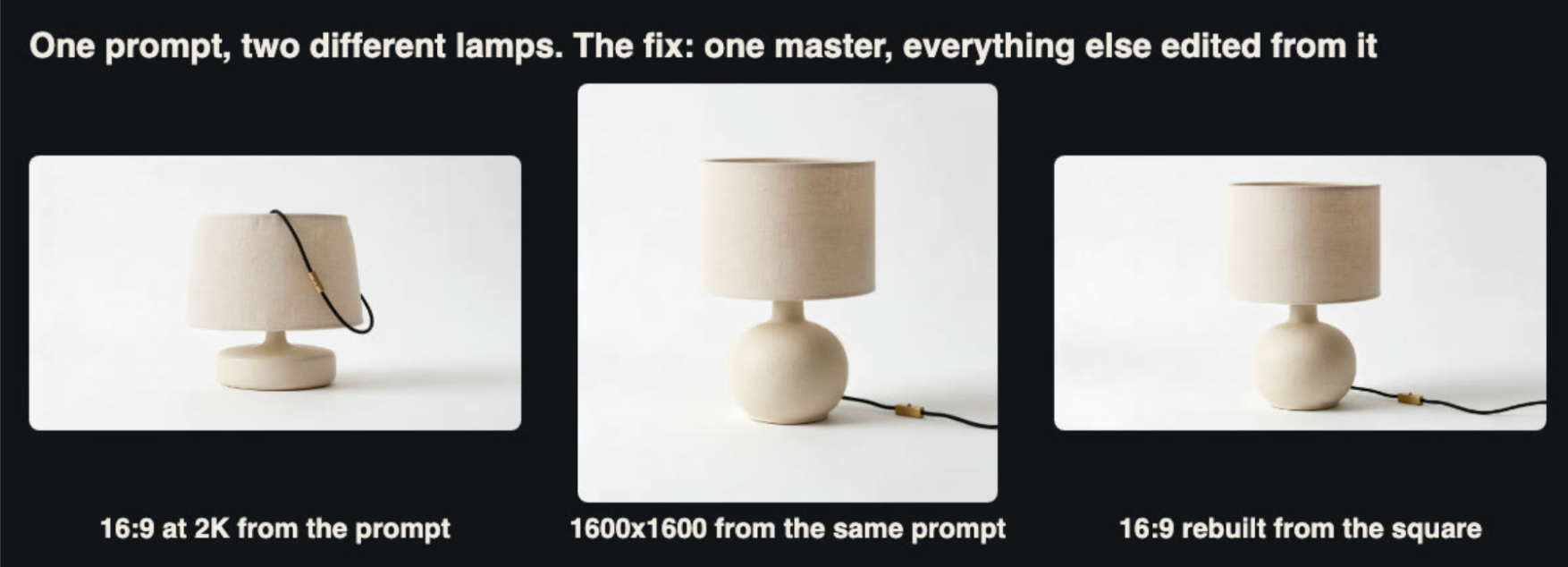
Left and centre: the same prompt at two sizes. Right: the 16:9 version rebuilt from the square one by editing.
The rule we took from this governs the rest of the article. Choose one master image of the product. Make every other still by editing that image, never by prompting again. With a real catalogue, your master is the product photograph you already have.
Test 2: rebuilding the wide frame from the master
We passed the square image back as a reference with the instruction "Recompose this exact product photo as a wide 16:9 frame: the same lamp, unchanged in shape, speckled base, linen shade, black cord and brass switch, standing centred on the same pure white seamless background with more empty white space on the left and right." It took 85 seconds and cost $0.053.
This time it was the same lamp. The spherical base, the drum shade and the cord running out to the right with its brass switch all match the master. The model did enlarge the lamp so that it fills most of the frame height rather than sitting with space above it. That suits a video frame, because the product is the subject, but it means the wide image is a recomposition rather than an extended canvas.
Test 3: a lifestyle scene, off and on
Product pages for lighting often show the lamp in a room. We made that scene by editing the master, not by describing a new lamp. The first edit placed "this exact lamp" on a walnut side table beside a grey linen sofa at dusk, switched off, with blue evening light from a window (94 seconds, $0.053). The second edit took that room photo and changed one thing: "switch the lamp on: warm light glows through the linen shade and casts a soft pool of warm light on the walnut table and the wall behind it, while the window stays blue" (110 seconds, $0.053).
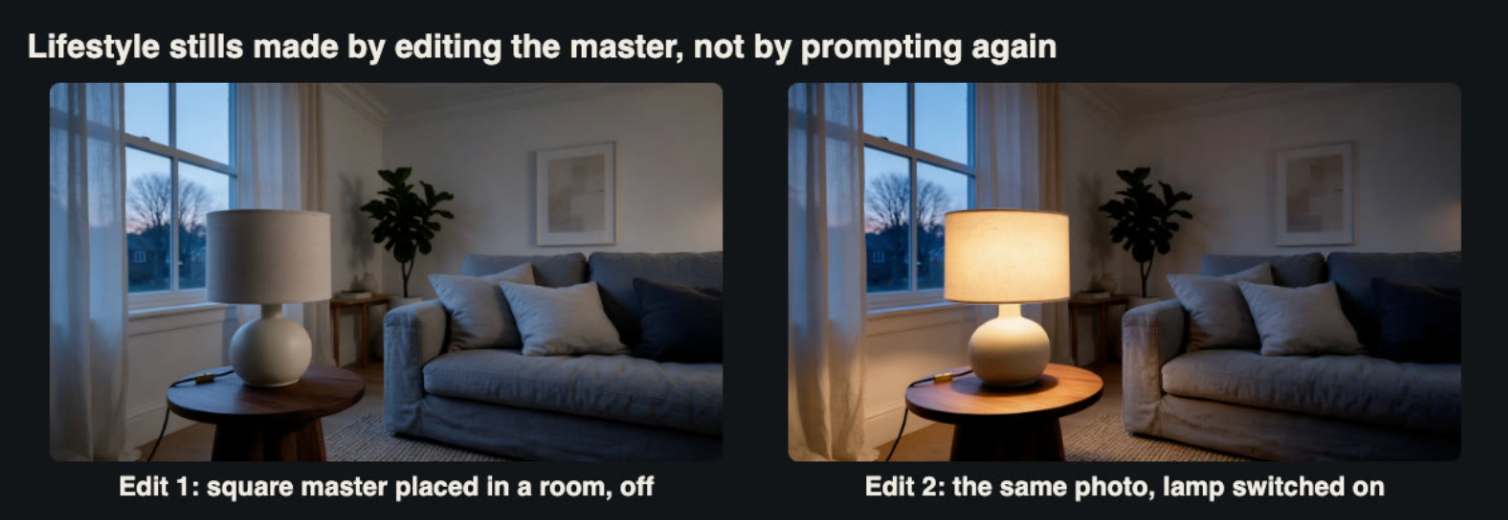
Two edits in a chain: master to room, then room to lit room.
The lamp survived the move into the room with its shape intact. Its speckle is finer and fainter at this distance, which is fair for a lamp seen across a room. The lit version kept the sofa, cushions, plant, picture frame and window exactly in place. That pair of stills turned out to be the most valuable asset in the whole test, as Test 7 shows.
Test 4: the turntable clip
A slow turn is the most common product video. We gave the wide packshot to Veo 3.1 Fast as the first frame and asked for "a half turn" on a hidden turntable, with the camera still and the shape, glaze, shade, cord and switch unchanged. It took 82 seconds and cost $0.126.
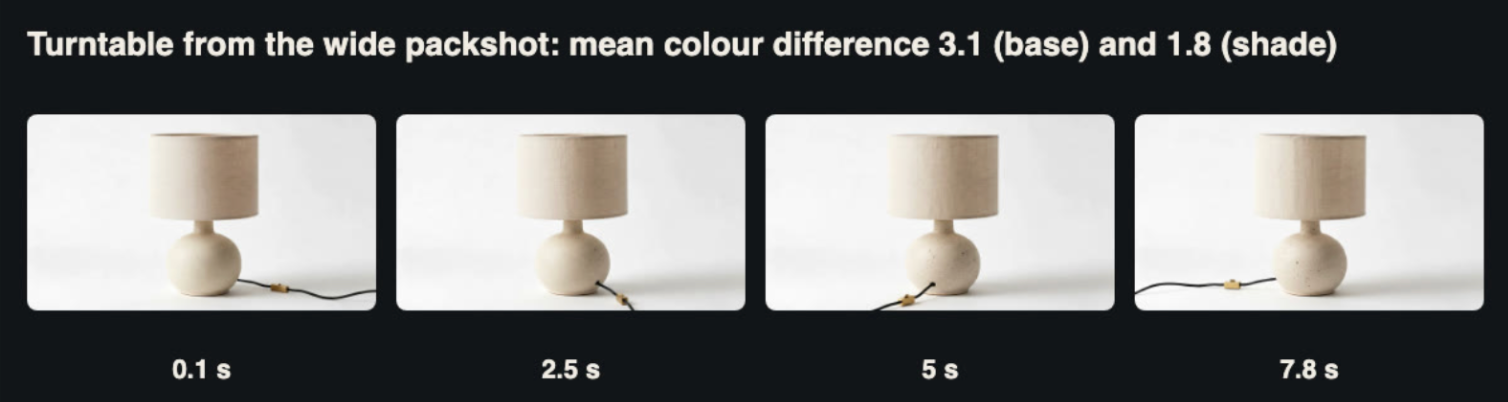
The result is usable. The first frame matched the packshot with an SSIM of 0.954. To check colour, we compared the median CIE Lab colour of the base and of the shade in 11 frames across the clip against the packshot. The mean colour difference (Delta E) was 3.1 on the base and 1.8 on the shade, and no frame exceeded 5.9. A difference of around 2 to 3 is hard to see without the two side by side. The cord swings round as it should when a lamp turns.
The colour held. The back of the base, which the packshot never showed, has a coarser speckle.
The model still had to invent the half of the lamp that the packshot did not show, and it did. As the back of the base comes round, the speckle becomes visibly larger and darker than on the front. A round lamp hides this well, because there is no missing handle or label. For a product with a distinct back, such as a chair or a bag, you would need a photograph of that side, used as a last frame.
One practical detail: this clip's audio track was silent, measuring -70 LUFS, which is the floor of the meter. It is safe to strip it, which you would do for a product gallery anyway.
The four motion tests that follow all start from the room stills in Test 3. We ran them through the Veo 3.1 API, with the variant changing from test to test, to see which combination shows the lamp being switched on correctly.
Test 5: a hand switches it on, Fast against Quality
We gave the "off" room still to Fast and to Quality as the first frame, with the same prompt: "a hand reaches in from the right and presses the small brass switch on the lamp's black cord; the lamp switches on and warm light glows through the linen shade". Fast took 94 seconds at $0.126. Quality took 92 seconds at $0.90.
Both opened faithfully, with an SSIM of 0.974 against the still, and both switched the lamp on at almost the same moment. We tracked the median brightness of the shade every quarter second. In both clips it jumps sharply between 2.3 and 2.55 seconds, from about 40 to about 76 on the L* scale in Fast and to about 65 in Quality, before settling around 83 to 85.
Neither pressed the switch. In Fast, a hand reaches over and grips the cord just to the right of the base, while the brass switch sits untouched on the table on the other side. In Quality, a hand in a black sleeve touches the ceramic base itself, and the lamp comes on as if it were a touch lamp. For a product page this matters more than any visual flaw: Quality's clip shows the lamp working in a way it does not. Quality also cost seven times as much.
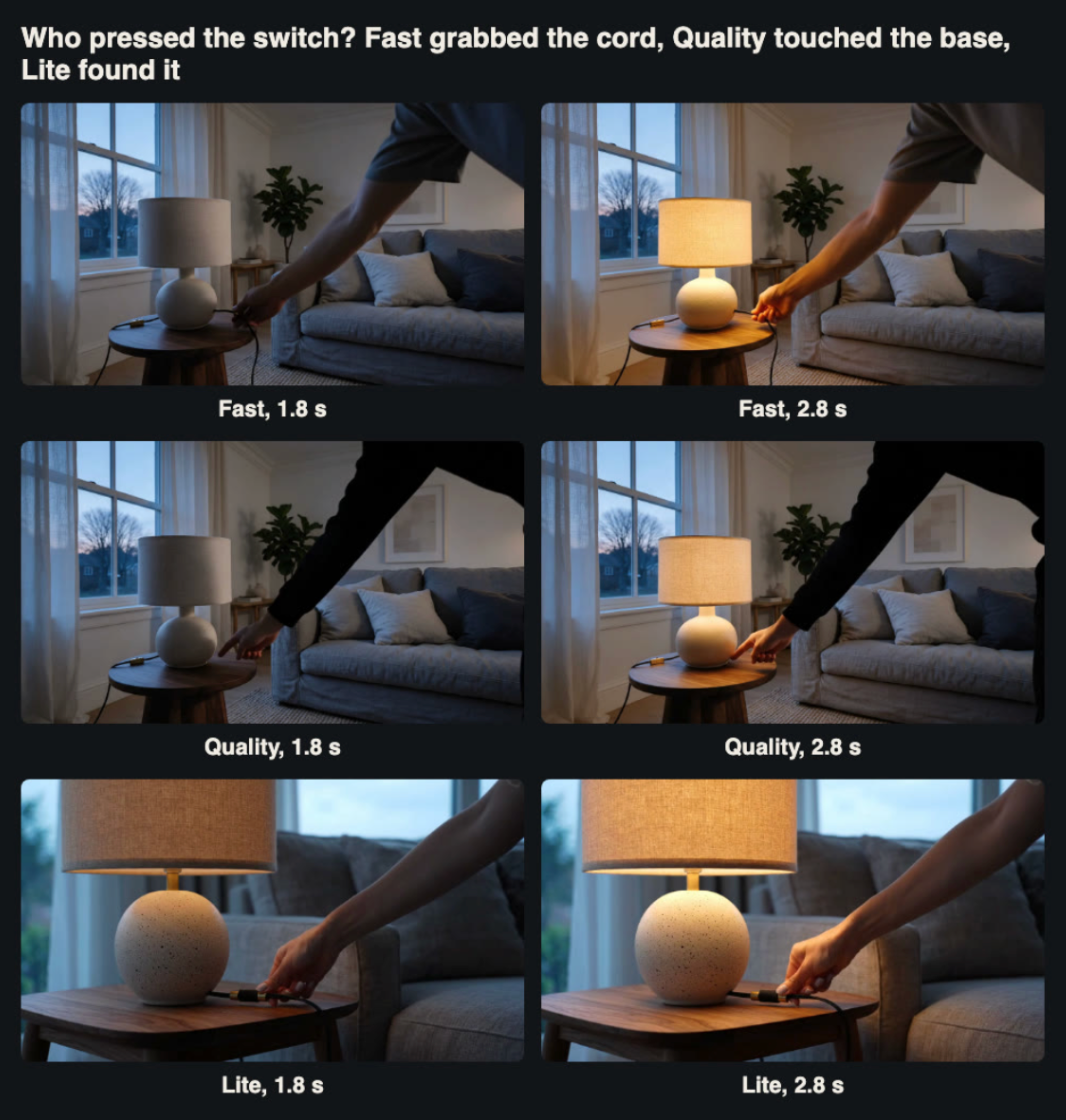
The moment the lamp turns on in three clips. Only the Lite clip puts the hand on the inline switch.
Test 6: the same scene from text only, on Lite
Lite costs $0.063 a clip and does not accept images, so we described the lamp, the room and the hand in words. It took 60 seconds.
Lite was the only variant whose hand went to the cord near the base and pressed the brass switch, and the lamp came on at the same 2.5-second mark as the others. The lamp it showed is similar but not ours. The framing is a tight close-up rather than a room. The base is a larger sphere with coarser speckles. The shade is lit from the first frame on its underside, before the switch is pressed.
That combination sums up text-only video for catalogues. Lite is cheap and sometimes follows an action more literally, but it cannot show your product, only something that matches its description. It is useful for testing whether a motion prompt works before spending on Fast with your real still.
Test 7: no hand at all, just two frames
The fix for the switch problem is to stop asking the model to perform the action. We gave Fast both room stills that we had edited with Seedream 5.0 Pro, "off" as the first frame and "on" as the last, and asked only that the lamp switch on while the camera stays still. It took 82 seconds and cost $0.126.
This was the best clip of the test. There is no hand to get wrong. The room does not move, and the lamp brightens in two stages: a soft rise from about 1.5 to 2.75 seconds, then a second rise from about 4.3 to 5.8 seconds, ending close to the lit still. The first frame matched the "off" still with an SSIM of 0.974, and the last frame matched the "on" still with an SSIM of 0.960.
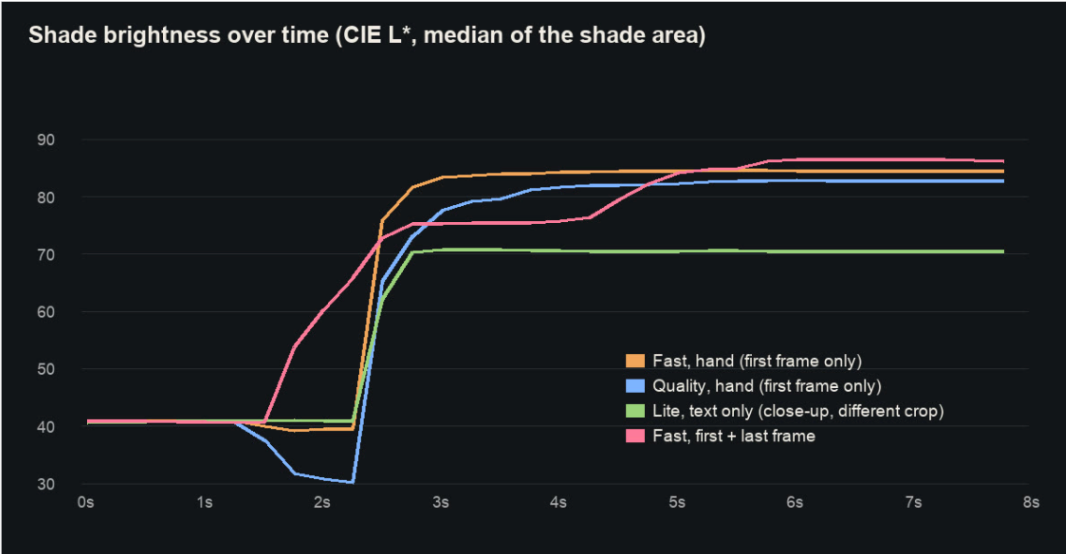
Shade brightness every 0.25 seconds. The hand-driven clips switch on abruptly at about 2.5 seconds. The two-frame clip brightens in two stages. The Lite curve uses a different crop because its framing differs.
For a lighting store this is the template: one master photo, two edits (off and on), and one first-and-last-frame clip. Image edits cost $0.105, the clip $0.126, and nothing in the result claims anything about how the lamp is operated.
Test 8: reference mode in a new room
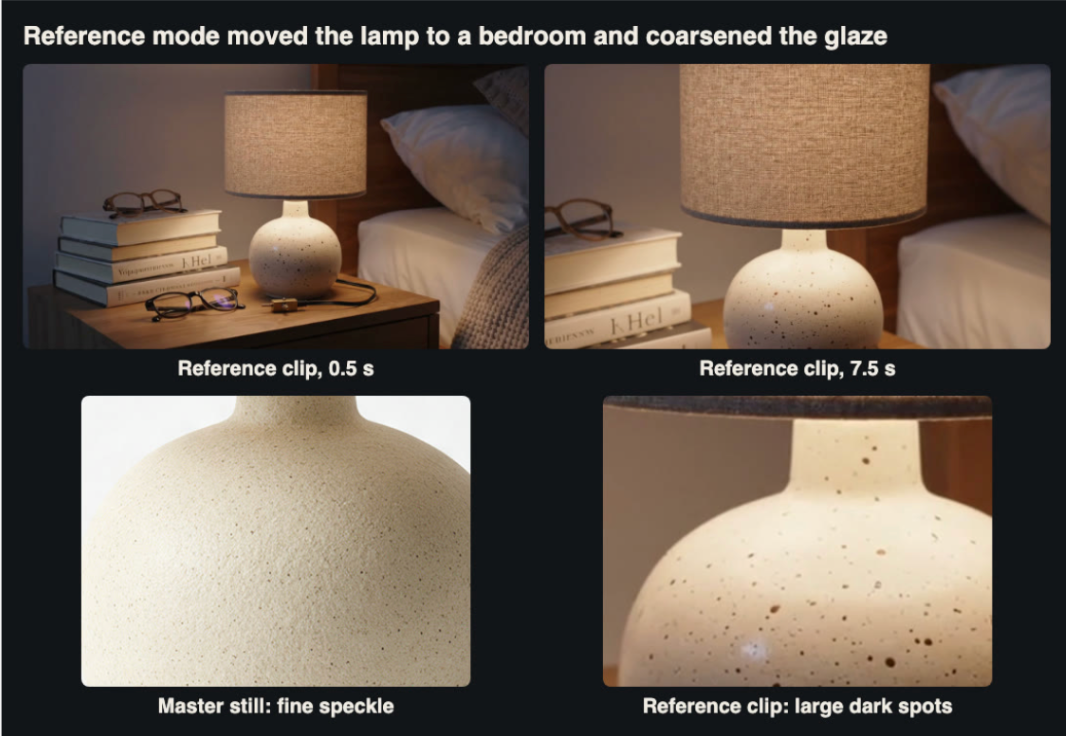
Reference mode would make it easy to place one product in many settings, so we tried it on Fast. We passed the square master as a reference and asked for the same lamp, lit, on a bedside table at night beside a stack of books and a pair of reading glasses, with a slow dolly-in. It took 61 seconds and cost $0.126.
The scene is attractive and the dolly is smooth. The lamp is recognisably the same shape. But the glaze is not the same. The master's fine speckle has become large, dark spots, so the clip shows a noticeably different finish. The prompt asked for a pair of reading glasses and the clip has two pairs. The book spines carry invented lettering, and the shade is barely lit. Like the turntable clip, its audio track was silent.
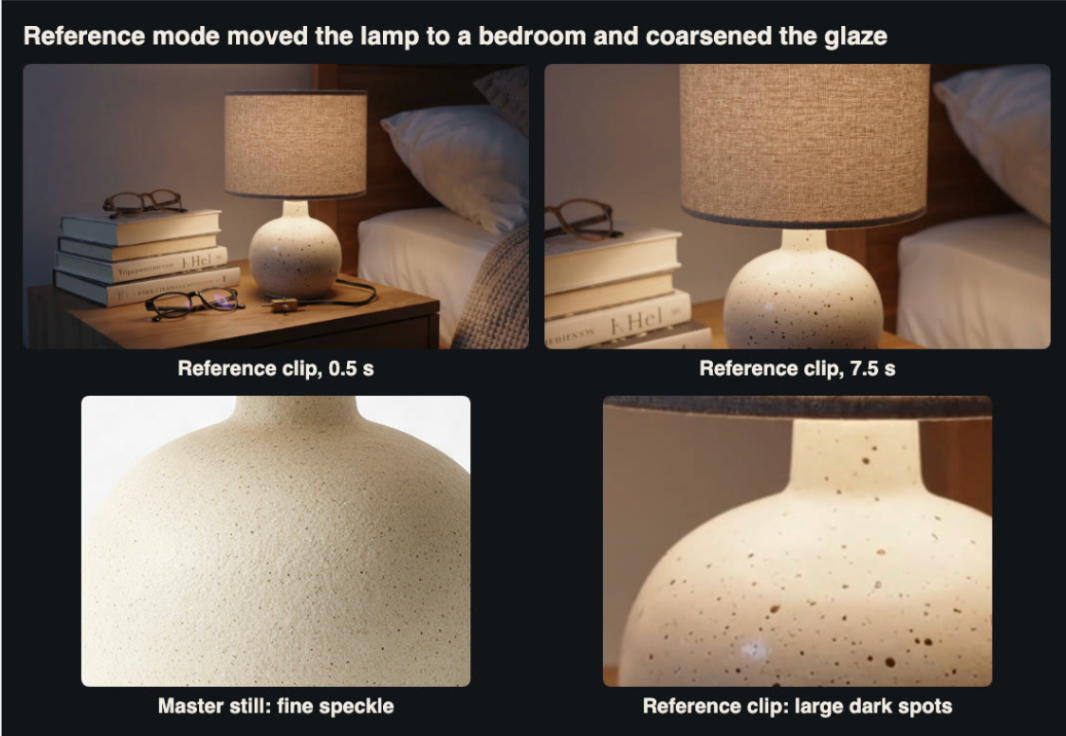
Reference mode kept the shape and changed the surface, which is the part a buyer of ceramics looks at.
For products whose appeal is in the surface, such as glazes, fabrics and wood grain, reference mode was the least faithful option we tried. We would use it for mood or category pages, not for the product's own gallery.
Test 9: formats for a product gallery
The last test was about getting the file onto a product page. How a clip reaches the page depends on your theme and setup. Some stores embed from a video host, and others serve an MP4 from their own media storage. These measurements apply in either case.
GIF. Veo 3.1 can return an animated GIF instead of a video (enable_gif). We asked for a quarter-turn GIF from the wide packshot. It took 121 seconds, cost the same $0.126, and returned only a GIF with no MP4. The GIF is 480 by 270 pixels at 16 frames per second, 127 frames, and 7.0 MB. It also turned the lamp about half a turn instead of a quarter.
MP4. The 720p turntable MP4 is 2.6 MB as delivered. Re-encoded with H.264 at CRF 26 and no audio it came to 0.56 MB. A centred 720 by 720 square crop for a square gallery slot came to 1.0 MB at CRF 23. Veo 3.1 only outputs 16:9 or 9:16, so a square crop is the way to fill a square slot, and the lamp sits comfortably inside it.
Provenance. The Seedream PNGs and Veo MP4s we received carry C2PA manifests identifying them as AI-generated media. Our re-encoded files did not, so if your store policy is to label generated imagery, the label has to be visible on the page.
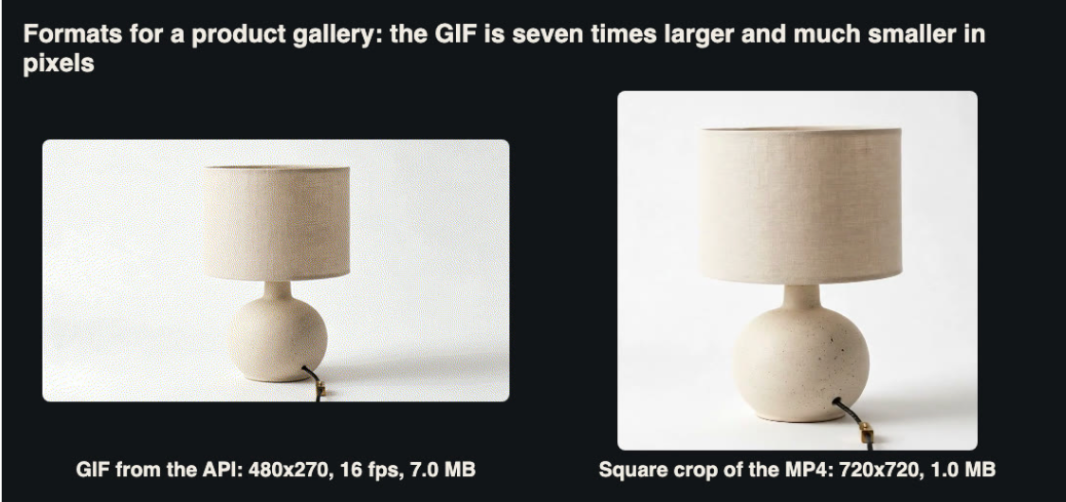
The GIF has a seventh of the pixels and seven times the file size of the square MP4.
On a product page, a muted, looping MP4 does everything a GIF does at a fraction of the weight. We would not use the GIF option for product galleries.
For anyone repeating this with their own catalogue, the stills were the cheap part and the most important one. All six cost $0.29 in total, and every good clip in this test depended on starting from one of them.
What it cost
Item | Count | Billed each | Total | Time |
seedream-5-0-pro, 1600x1600 | 1 | $0.026 | $0.026 | 53 s |
seedream-5-0-pro, 2K (text and edits) | 5 | $0.053 | $0.263 | 58-110 s |
veo3.1-lite, text only | 1 | $0.063 | $0.063 | 60 s |
veo3.1-fast (first frame, two frames, reference, GIF) | 5 | $0.126 | $0.630 | 61-121 s |
veo3.1-quality | 1 | $0.90 | $0.900 | 92 s |
Total | 13 | $1.83 |
These are the amounts billed to our account, and rates depend on account tier, so check current pricing before you plan a catalogue run. Quality was half of our spend and produced the least accurate depiction of how the lamp works. The workflow we would actually use per product is a master photo you already own, two or three edits, and two Fast clips (a turntable and a two-frame scene). That comes to about $0.40 in generation fees, before anyone's time to review it.
Narrated walkthrough of the nine tests with the generated clips. All imagery is AI-generated.
A checklist for catalogue video from stills
1. Pick one master image per product and edit everything from it. The same prompt at two sizes gave us two different lamps.1.
2. Look for impossible construction. One generated packshot ran the cord over the top of the shade.
3. Do not let the model perform your product's function. Fast pulled the cord and Quality turned the lamp into a touch lamp.
4. Show state changes with a first and a last frame. Off and on stills gave the cleanest clip in the test.
5. Measure colour, and look at the surface as well. The turntable held colour within a Delta E of about 3, but the unseen back had a coarser glaze.
6. Keep reference mode away from surface-led products. It turned a fine speckle into large spots.
7. Serve muted MP4, not GIF. The GIF was 7.0 MB at 480 by 270; a 720 by 720 MP4 crop was 1.0 MB.
8. Have a person watch every clip before it goes live. Every fault we found was obvious once someone looked for it, and invisible to an automated colour check.
The bottom line
For a catalogue that already has clean product photos, generated motion is close to practical. A turntable from one packshot held its colour, and a two-frame off-to-on clip produced a lamp being switched on that we would put on a product page, for about thirteen cents each. The failures were consistent, and they all came from asking the model to know something it had not been shown: the back of the base, how the lamp is switched, what the glaze looks like up close. Give it the views and states you want to show as stills, ask it only to move between them, and keep a person in the loop for the final check.
Related Posts
- Product Video for a Magento Catalogue From One Still: Nine Tests With Seedream 5.0 Pro and Veo 3.1 on a Table Lamp
- How Digital Booking Systems Are Modernizing Wedding Transportation
- AI in Logistics: Practical Ways to Improve Supply Chain Efficiency
- E-commerce Testing Checklist: 12 Things to Test Before You Launch
- Wayfront vs Clinked vs Moxo: Best Agency Client Portals
- Running Age Checks on a Magento Store After Launch