



Improve Magento 2 repeat purchase reporting with clear buyer definitions, mature cohorts and checks for guest orders, refunds and sales totals.
Magento 2 repeat purchase reporting can produce a different customer count from a sales report. A customer purchases running shoes on a Monday. Three months later, the customer returns to buy insoles. Both transactions appear in the sales report. However, the retention report may count the shopper as a new customer twice. It may also fail to link the two orders. The calculations in each report may be accurate, but they are in fact measuring different things.
That is a familiar reporting problem for Magento 2 stores that offer guest checkout, have account signups, process refunds, operate multiple storefronts, or use marketing tools with their own IDs. Before setting up a win-back offer, define which orders count.
Then identify which shoppers can be matched.
Finally, check whether each buyer had enough time to return.
You can't give a single percentage as an answer to these questions.
Establishing those definitions is a core part of ecommerce analytics consulting: making sure customer counts, order totals and repeat purchase rates tell a consistent story.
A practical method for developing a repeat-purchase view from your e-commerce data follows. It works whether you use Adobe Commerce Intelligence, spreadsheets, or another BI tool. The small numerical example is entirely fictional. The diagrams are editorial illustrations, not screenshots of an existing Magento report or industry benchmarks.
What you’ll learn
• Why does the number of customers in Magento 2 differ from that shown in a repeat-purchase report?
• How should guest orders, refunds, and multiple storefronts affect who counts as a buyer?
• When is a 30-, 60-, or 90-day repeat-purchase cohort mature enough to report?
• Before carrying out a win-back campaign, what should a store owner check?
• Which order-level and customer-level totals should reconcile, and which should remain separate?
I. Define buyers in Magento 2 repeat purchase reporting
A checkout, an order, a registered account, and an identifiable shopper are not to be treated as equivalent. A single registered customer is capable of placing more than one order. It is possible for a guest buyer to have no account record, in which case the customer_id on their order may be null. Adobe's Commerce Intelligence environment guide explains this distinction: guest orders do not create registered-customer records, so an account count and a buyer count are not necessarily the same.
A practical definition for a store manager is: "A customer in this report refers to one shopper whose qualifying orders can be matched with an approved identifier." The statement does not apply to every site visitor, every new account, or every attempt to check out. People who have registered but have never placed an order are not considered purchasing customers, and if a guest has three orders, that doesn't mean it's three different individuals.
Judgment is needed when matching guest orders. An email address can help, but the match may fail if the customer changes their email, shares a family inbox, or has inconsistent data imported from another storefront. If you are not sure you can link a guest order, place it in a group that is clearly labeled and marked as unlinked. Keep that order in sales reconciliation, but exclude it from the identifiable-buyer cohort unless a reliable match is established. Do not attempt to identify customers just so you can complete the retention chart. Store the original contact information in a secure system and, whenever possible, use approved pseudonymous keys when producing shared reports.
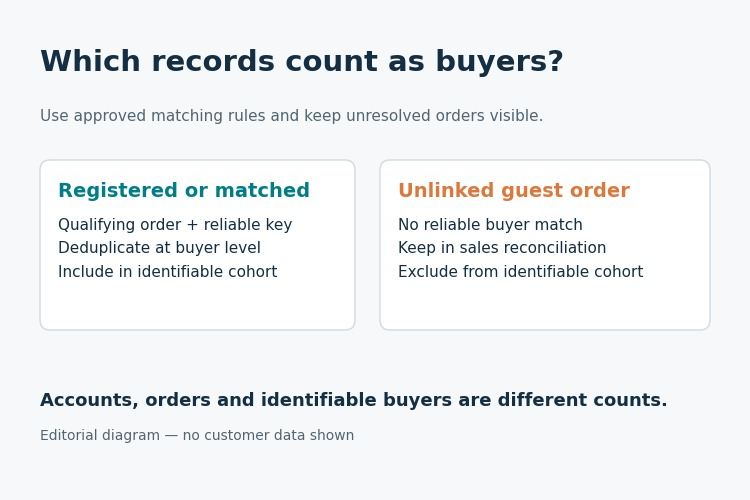
Figure 1. Approved buyer matching determines cohort eligibility. Unlinked guest orders remain in sales reconciliation.
Qualifying orders and store scope
First, decide what constitutes a qualifying purchase. Are pending-payment and cancelled orders being excluded? Should a fully refunded order still count in the behavioural purchase history, even if its net-sales contribution becomes zero under the chosen policy, or should it be excluded from the repeat-purchase measure too? What about partially refunded orders? Are test or staff orders being excluded as well? Choose which event date will be used to define the cohort and make it clear what reporting time zone is being used, particularly when orders are placed just before or after midnight.
Cart abandonment should not be counted as a purchase. If you are running more than one store, clarify the scope of the report—is it for one Magento site, all the store views of a particular brand, or for several separate stores? Currencies should be converted in a clearly documented manner before the totals are added up. The fact that you have a translated store view does not mean that you have a new customer base.
Don't simply accept the default grouping that your tool provides; the solution should be appropriate for the business.
You could consider treating loyalty members as a distinct group, but the fact that someone is a member does not mean that they are a repeat buyer. It's possible for a person to join the programme at the same time as placing their first order, and in another case someone might make five purchases without ever signing up. It's important to keep account membership, buying behaviour, and marketing permission as separate categories. This approach also simplifies the audit of the dashboard should there be any changes to the loyalty programme – your buyer count should not suddenly become a member count.
For ideas on programme design, Landofcoder’s customer loyalty strategies for Magento provides related reading. Assess those tactics separately from the definition of a repeat buyer.
As a quick check, reconcile included orders by status and storefront to source records. Keep the exclusions so another analyst can reproduce the same total next month.
II. Calculate the repeat purchase rate after the window closes
The 90-day repeat rate deals with one very particular question: among those shoppers who made their first observed qualifying purchase in the cohort, how many made a second qualifying purchase within the next 90 days? Everyone in the denominator must have had the full 90-day opportunity to return by the reporting cutoff. It wouldn't make sense to label someone who made their first order yesterday as a 90-day non-repeater on today's date.
Suppose there are 100 buyers in an imaginary group, and each of them has the full 90-day period. By day 60, 29 of them have made a further purchase. Between the 61st and 90th days, an additional six people place their first repeat order. This gives 35 repeat buyers out of the 100, a 35% repeat rate over 90 days. The remaining 65 have no second order linked within that time frame. It is possible for a missing identifier to still conceal an order.
When the 30-day, 60-day, and 90-day figures are displayed together for the same fully matured group, they are cumulative buyer measures. The 90-day figure must not treat third orders as additional repeat buyers; if you wish to examine order frequency, use a separate measure. Adobe's customer repurchasing analysis discusses repeat-order probability, average order count and time to next order. Its order-based repeat-order probability is not the same calculation as the buyer-based 35% cohort rate used here.
You should also consider the percentage of customers who placed two or more orders over the past year, but this involves a different group and time frame since it refers to customers who were active during that period, not to new customers who have been followed up on for the full 90 days. Do not include both figures under the same 'retention' heading; instead, label them clearly and state the purpose of each.
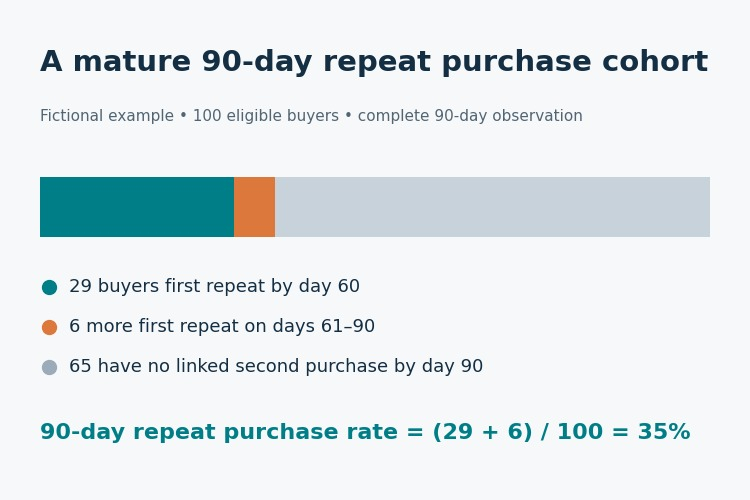
Figure 2. Fictional cohort of 100 eligible buyers. By day 90, 35 have a linked second purchase and 65 do not.
History and refresh cutoffs
There is also a historical problem. The term 'first observed' does not mean 'first ever'. For example, if your export begins in January but the store has been open for five years, a person who makes a purchase in February might in fact have bought before that time. A wash-in period can help with this, or you can simply state that the figure refers to the first appearance in your available history. In either case, this does not prove that the customer had not bought earlier.
Late refunds and alterations to orders can affect the history of a cohort. When you refresh the data, decide whether or not to recalculate the previous cohort values and indicate the reporting cutoff that was used to obtain the most recent figures. If a late return causes a historical metric to change, then explain this change. And when you modify the rules, refer to it as a method change rather than as a sudden change in buyer behaviour.
It is important for store owners to be able to distinguish between repeat buyers and repeat orders. For instance, one of the 35 repeat buyers may place three further orders, but they are still only counted as a single repeat buyer; their additional orders should be included in the calculations for frequency, net sales, or basket size. Although this seems straightforward, it is simple to overlook when a chart groups the orders by customer and then just adds up the rows. So, before you total up the figures, check the records of a few customers.
Practical check: For each displayed cohort, note the month of the first observed purchase, the number of eligible buyers, the number who repeated by days 30, 60 and 90, and the cutoff date. For immature windows, leave the entries blank or present them separately—don't quietly include them in the denominator. In the fictional example above, no day-30 figure is specified.
III. Turn Magento 2 customer retention insights into a test
It is important for people who run stores to know what they should be focusing on. Begin by looking at three different views: the groups of customers who make their first purchase and then a second one, the length of time between purchases, and net sales according to how frequently people buy. These views suggest where to investigate identification, timing, product mix, or something that you could test. However, they will not explain exactly why a customer returned.
If you notice early repeats in a category but don't see a large number of new repeaters between days 61 and 90, you should investigate the reason. It could be that the product has a short buying cycle. It might be that the first order was placed as a result of a quick promotion. Perhaps customers are buying replacement parts from another storefront which isn't connected to your IDs. Or perhaps the second order is simply appearing as a different guest. In each of these cases there will be a need to carry out a separate check. If the issue is related to identity, then sending an offer might end up targeting people who have already come back.
Purchase cycles also matter. For cosmetic refills, a few weeks could serve as a suitable period before making a second purchase, but with appliances this probably wouldn't be the case. Gifts follow their own seasonal patterns. Instead of simply declaring everyone to be 'dormant' at some arbitrary cutoff point, you should look at the product in question, the group of customers, and a sufficient number of past orders in order to establish a definition that makes sense.
The report should reflect observed recency and not make guesses about churn. You should also consider carrying out a controlled follow-up with customers who are both lawfully and appropriately contactable. Before launching, it is necessary to define your target audience, the basis of permission, the comparison group, the message, the cost of the offer, the observation period and the primary outcome. Using a holdout group can help in telling the difference between normal seasonal purchasing and the effect of the campaign.
If the business is not able to support a credible comparison, then it should report the weaker observational result without making any causal claims.
Campaign eligibility and evaluation
A repeat-purchase cohort can help you decide when to investigate a follow-up workflow, but it does not mean that all shoppers are contactable. The execution system still has to check suppression lists, current consent, recent purchases, undelivered orders and customer-service cases. Those permission checks should remain separate from the reporting model.
A useful validation method is to compare second purchases per eligible customer over a specified period against a credible holdout, together with incremental net sales or gross profit after the cost of the offer. Without a valid comparison, report the observed change rather than claiming it was incremental. Open and click rates can indicate engagement, but they do not reflect actual incremental purchases. If the evaluation period permits, include returns. You also need to consider the operational side effects; a promotion could result in more second orders, lower margins, higher return rates, or shift orders that customers would have made anyway.
If possible, provide a view that includes cost and margin. Specify who will halt or modify the pilot if the results are unacceptable. Avoid comparing treated and untreated groups with different buying cycles.
For a store owner the choice could be simple—carry out a test to see whether a timely, consent-aware post-purchase message has an effect on the second-order rate for a particular group. The proposed reporting view frames the question; a properly designed comparison supplies evidence for the answer.
Landofcoder’s guide to using personalization to build brand loyalty offers ideas for follow-up messages. Use a controlled comparison to assess any resulting change in purchases.
IV. Reconcile Magento sales, refunds and product views
Even if a dashboard displays a good average order value, revenue might end up being double-counted. A typical error is to add the order-level grand total to each individual line item, which means that an order containing three items has its total added three times. Order-level measures should be calculated at the order level and item-level amounts should be used when carrying out category or product analysis. Adobe's expected Commerce data guide lists orders and order items separately. It is only appropriate to combine them into a single total if there are clear rules stating how this should be done.
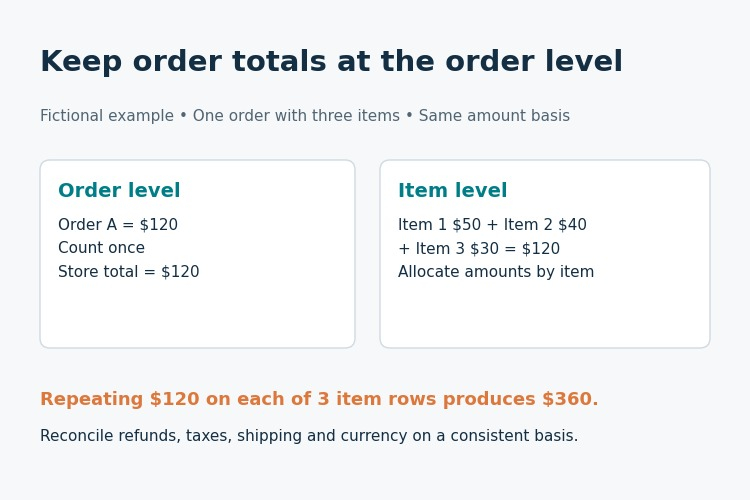
Figure 3. Fictional $120 order split across three items. Repeating the order total on every item row would overstate the amount.
Refunds and overlapping categories
Refunds are also a frequently encountered trap. The grand total, the invoiced amount, the paid amount, and net sales after returns are not all the same. You should note which of these measures you are using and then check it against the original transaction and payment or credit memo records. Adobe's credit memo guidance covers full and partial refunds. An order that has been partially refunded could still be considered a qualifying purchase, even if the net amount has changed. While the rules may differ from one business to another, don't alter them from page to page in your report.
Category reporting also needs its own check. Since a product may belong to more than one category and an order can include items from different groups, there is a possibility of overlapping categories or of customers being present in multiple categories, which can cause the percentages for the categories to total more than 100%. If management expects the categories to add up to overall store sales, then net sales should be allocated specifically. You should not pretend that all the charts add up and must make it clear what the difference is.
Combining different channels or stores creates another identity problem. If you refer to it as 'omnichannel customer behaviour', you need approved identity matching in order to link the same shopper across various channels. It's acceptable to have separate total figures for stores and online orders, but you can't simply count a customer as one who uses both channels just because the two systems use the same product codes. If you are unable to match up identities across channels, then you should create an unknown or unlinked group.
Extensions, spreadsheets and BI tools can make sales, customer and product reports easier to use, but they cannot on their own remedy unclear source definitions. A small reconciliation table is often more useful than another sophisticated chart when two metrics disagree.
Prepare a single monthly control record that includes the source order count, excluded orders, included orders, unique approved customer keys, unlinked guest orders, the gross order amount, adjustments, and the net amount as specified in the report. Summary results should only be displayed after you have checked the differences at the lowest level possible. The objective is not to ensure that all the numbers agree, but rather to identify which numbers should agree and to provide the reasons for this.
Above all, make sure you understand how currencies and taxes are treated. Orders from various sites may be based on different base currencies, and dashboards typically display only one reporting currency. While taxes and shipping may be included in the grand total, they won't appear in a merchandise-only sales figure. Gross or net amounts can each be used for AOV, provided that both the amount and the eligible-order denominator are defined consistently. Results become unreliable if someone mixes base and display currencies or omits shipping on just one page.
Use the appropriate source field for each measure rather than simply selecting the nearest total. Check by selecting a few individual orders that have multiple lines, a partial refund, a full refund, and one that involves a guest checkout. Follow these orders from the source events all the way through to the final dashboard. It's possible for the aggregate total to be correct while the detailed figures are still inaccurate.
V. Maintain the reporting system
Attach a short KPI definition sheet to the proposed report. For every KPI, list the source, the business grain, the date basis, the matching key, the inclusion rules, the refresh cutoff, the owner, and the method by which you expect to reconcile things. With regard to repeat-purchase measures, you generally need an order ID, an approved customer key, a qualifying status, the order timestamp, and the net order amount. When you later modify a record, make the update rather than creating a duplicate.
Regarding the cohort grid, it should display the month in which the first purchase was observed, the number of eligible identified buyers, the number of buyers who placed a second order by day 30, 60 or 90, and each of the mature rates. Include unlinked guest orders and exclusions in the main quality view rather than putting them in a footnote. The manager can then consider whether the drop in repeat rates is due to changes in purchasing behaviour, incomplete windows, missing identities or a source correction.
When it comes to large-scale operations, the warehouse should be responsible for handling history, identity rules, and order-level calculations; the presentation layer should be used for tagged comparisons and business decisions. The results can be viewed in Adobe Commerce Intelligence, another BI tool, or in a good spreadsheet, since the main definitions should continue to function even if you change tools. You should not export raw email addresses to a shared analyst workbook simply because it appears to be an easy join key.
There should be some person responsible for auto-refresh as well. Who approves changes to the identity rules? Who looks at the order-status exclusions and the late refunds? Who gives the go-ahead for a source-system migration? If nobody is in charge of the report, you'll end up with incorrect figures every morning. Begin with a weekly reconciliation and then proceed to automation when the exception list has stabilised.
Until you've established identity and order continuity, transferring to a new Magento instance should be treated as a measurement change. A migration could deal with guest records in a different way, reuse old IDs, or import previous orders with new timestamps. It's important to check for duplicates and key populations both before and after the switch. If you notice a large number of 'new customers' on the day of the migration, this is a signal to investigate data quality, not to hold a marketing event.
A good handover consists of a five-row sample of deliberately fictitious orders: one order from a repeat shopper who is registered, one guest order that can be matched according to the policy, one unlinked guest order, one cancelled order and one order that has been partially refunded. The way the data is processed should be shown step by step in this manner, so that a new analyst can test the rules without being given access to real customer data or having to assume that every checkout record refers to a different person.
VI. Check the report before release
Before the weekly Magento 2 analytics report circulates, ask five questions:
1. Identity: Is it possible to tell apart registered customers, guests who have been reliably matched, and unlinked guest orders without counting them twice?
2. Eligibility: Does the system adhere to the established rules for cancelled, refunded, returned, test and incomplete orders?
3. Observation: Has each shopper in the relevant 30-, 60- or 90-day cohort had the full time needed to return?
4. Reconciliation: Do order-level counts and amounts agree with the source after the approved exclusions? Are category totals free from accidental duplication?
5. Action: Does the suggested follow-up have a clearly identified audience, a permission basis, a comparison group, and both a cost and an outcome measure?
When selecting the audience for the report, treat it in the same way as you do when choosing the metrics. For example, a store owner may prefer a one-page summary together with the number of exceptions. A merchandising lead will require the time-to-repeat figure for each product, while a CRM manager needs to know who can be contacted and should be given access to the test results. Provide everyone with the context they need, but make sure that one agreed definition is used for each measure. If different departments are using different definitions, then clearly state this rather than pretending that they are the same.
When a check fails, state this in the report. It's better to have a small, well-defined group than a large one consisting of accounts that have been merged or of incomplete windows being counted. Leave the group unresolved and make a plan to return to it later. The real issue is whether the team can explain the exceptions just as well as they explain the main result.
Conclusion / Final thoughts
The real value isn’t just a flashy retention percentage. It’s a repeat-purchase report where you can explain the customer count, purchase window, qualifying orders, and follow-up—and do it again next month.
Related Posts
- Running Age Checks on a Magento Store After Launch
- Adobe Commerce Website Development: Building a Connected B2B Purchasing Workflow
- Why Ongoing Magento Maintenance Matters for Growing eCommerce Stores
- Ecommerce SaaS vs Custom Ecommerce Software: Which Model Fits Enterprise Retail?
- Integrating Mini-Games into Magento 2 Mobile Apps to Boost Retention
- Why Your App Needs a Content Backend: Pairing Mobile App Development Services With a Headless CMS