



Learn New Digital Skills faster by practicing with interactive online resources instead of relying only on passive tutorials. From prompt engineering and AI writing tools to video editing and gaming platforms, hands-on practice gives beginners immediate feedback and helps turn new digital concepts into practical skills. This guide explores how interactive tools can make digital learning more engaging, accessible, and effective.
How Beginners Can Learn New Digital Skills Through Active Learning
I have seen people jump into a new digital skill and spend the first 20 hours on videos that do not require much effort. They watch a clip, give a few “yeah, got it” nods and then they forget most of it as soon as they start the program. If you want real progress, you have to use the tools right away.

Interactive online resources have reshaped tech training in a big way. It is not like before, when you had to slog through thick manuals to get started. Learning things such as machine learning, basic coding, or video rendering can be much simpler now. You do not just read and hope it clicks. You test ideas in a safe space. Most modern sites give you feedback right away. Change a setting and the outcome shows up fast. That quick try, then check, then try again helps you remember the steps. It builds skill with less waiting than older methods. In the end, the main idea is to work on tasks, not just watch tutorials.
Mastering Prompt Engineering
People say they can talk to a language model but it gets harder when you need a specific result you can rely on. A blank chat screen can feel awkward. New users sometimes write just one line, then get a vague reply. After that, they decide the tool does not work even though they did not set it up well.
The best way to correct this is to learn how experts organize their requests. A good prompt library is available online so you don't have to guess at the parameters, formatting requirements and context phrasing of an experienced user. These examples are dissected to learn how the machine understands instructions. You copy a working structure tweak some of the variables to suit your project and get live feedback on how the output changes. That direct feedback loop is the way you get to know the logic of the system. You no longer use the software as a search engine but instead use it as a programmable database.
Practical Applications in Writing
After grasping the fundamentals of input/output, one can use it in everyday tasks. One of the most frequent and very useful starting points is to work on business communication.
When beginning, many users will change their own typical e-mails, client pitches or internal e-mails using the AI tone rewriter. They type in a rough or jagged version and let the program edit it to smooth out the lines, refine the timing or formalize the language. The main benefit is seeing the software replace the vocabulary and reorder the sentences as they are spoken. The system shows you what editing makes a good professional journalist. You adopt these patterns in your mind over time. You begin to write better first drafts since you've seen how the software helps you correct your common mistakes.
Visual and Video AI Tools
Text is just the baseline. Video editing used to require months of learning complex timelines, manual keyframes and color grading theory. Now, the learning curve is entirely different.
Interactive platforms let you drag and drop footage while automated features handle the heavy lifting. You learn the concepts of editing by curating the machine's choices rather than executing every technical click. If you need to cut a long interview into shorter clips for social media you might use an AI Scene Finder to automatically detect camera cuts and highlight the active speakers. Playing with these features teaches beginners the fundamentals of pacing and composition. You don't have to manually scrub through hours of raw footage to find the good parts. The software identifies the structural elements of the video allowing you to focus on the storytelling aspect of the edit.
Generative AI for Personal Use
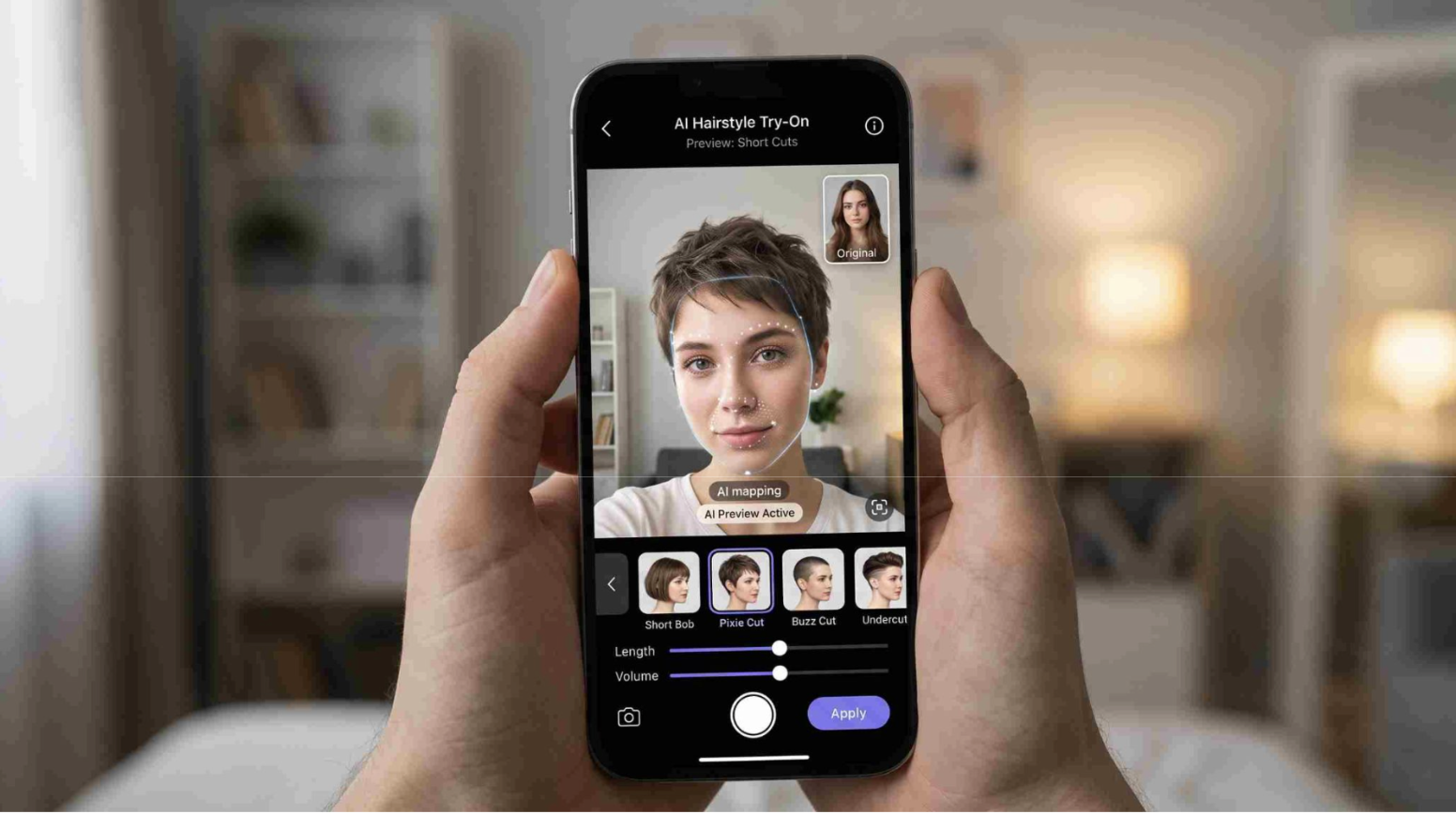
Not all digital skill development happens in a corporate context. Sometimes the best way to understand a complex new technology is to use it for something completely trivial.
One example of this is image generation tools. User may test an AI short haircut preview app to simply view what they would look like with a bob or a completely different shade of hair. They explore masking regions, texture blending and face recognition while they are poking around with the light sliders. The technology is accessible due to the low stakes. They quickly master the software's constraints as they can see exactly what their own face should look like. If the software gets an extra ear or merges the hair into the background; the user knows right away where the current limits of the technology are.
Gaming as a Sandbox for Skill Development
Some people do not treat video games as a real way to learn digital skills. But today’s games are not simple. They are huge and detailed and they push players to study, plan and handle limited resources. You cannot just roam and hope it works. Most players use maps you can interact with search tools made by other players, and online guides that keep changing.
A beginner trying to optimize a virtual base might study a Palworld game guide to understand supply chains, worker pathing and resource allocation. Navigating these external resources teaches you how to parse large datasets, cross reference contradictory information and apply technical logic to solve an immediate problem. You have to test a theory in the game, measure the output of your factory and adjust your strategy based on the data. It's the exact same skill set required to manage enterprise software, configure a customer management platform or run an agile project board. The context is different but the cognitive load and problem solving mechanics are identical.
Building a Sustainable Habit
Getting started with technical work is easier than it used to be. Lots of tools are already out there and many of them run right in a normal web browser. Also, the limits from older hardware are not as big a deal now. That means fewer people get blocked from tasks like video rendering or heavy computing.
The trick is to stop consuming content passively and start interacting with the software directly. Pick a specific problem you want to solve today. Find a tool that addresses it and spend an hour pushing the buttons. You will figure out what works. You will definitely figure out what breaks the system. That practical process of trial and error is the only reliable way to build long-term technical competence
Related Posts
- Running Age Checks on a Magento Store After Launch
- Adobe Commerce Website Development: Building a Connected B2B Purchasing Workflow
- Why Ongoing Magento Maintenance Matters for Growing eCommerce Stores
- Ecommerce SaaS vs Custom Ecommerce Software: Which Model Fits Enterprise Retail?
- Integrating Mini-Games into Magento 2 Mobile Apps to Boost Retention
- Why Your App Needs a Content Backend: Pairing Mobile App Development Services With a Headless CMS